03.05 · Strings / Code along · 19 min
Explore string methods
A label can contain the right words and still need cleanup. Built-in string methods give you a few useful tools.
Activity 5 of 6 in Strings
JavaScript Basics / 03.05
Explore string methods
Not started
Follow the original string-methods walkthrough and practice trimming whitespace, changing case, and reading length.
Your lesson progress
Empty: not started. Yellow: in progress. Green: complete. Marking the whole activity complete does not replace your test results. These circles save in this browser for this pilot.
ORIGINAL WALKTHROUGH · 18:12
Watch with Rob.
Pause whenever you want to try a change. You can return to the lesson at any time.
You are signed in, but video access needs attention. Check your account access. Your saved work is kept.
Video walkthroughs are included with an active Code Zone membership. The written lesson and practice are free.
Open video & code editor (opens in a new tab)Clean and inspect a text label
Work through 5 focused steps. Read the explanation, type each requested change and check it before moving on. Your own code carries forward.
The mini-lesson opens in a new tab. Your own code carries forward; each step has a focused check and an optional hint.
Start mini-lesson(opens in a new tab)5 steps · Saved work · Instant feedback
YOUR TURN
Try the examples on this page
Choose Load this code into the editor beside an example, then edit and Run code here. Predict what will print before running it. This is an exploration workspace, so there is no pass/fail challenge. Its saved work stays separate from the next practice activity.
Load an example, edit it and run it. Word wrap is enabled.
Your check results
Work in VS Code instead
Copy the starter into a file named practice.js in VS Code. If Node.js is installed, open the terminal in that folder and run node practice.js. Compare the output with the task above. Automated challenge checks are available in the browser editor.
const original = "  Code Zone  ";
const trimmed = original.trim();
const upper = trimmed.toUpperCase();
console.log(upper); // CODE ZONE
console.log(original); // Still has its original spacesOpen the code-along notes
Start with two useful tools
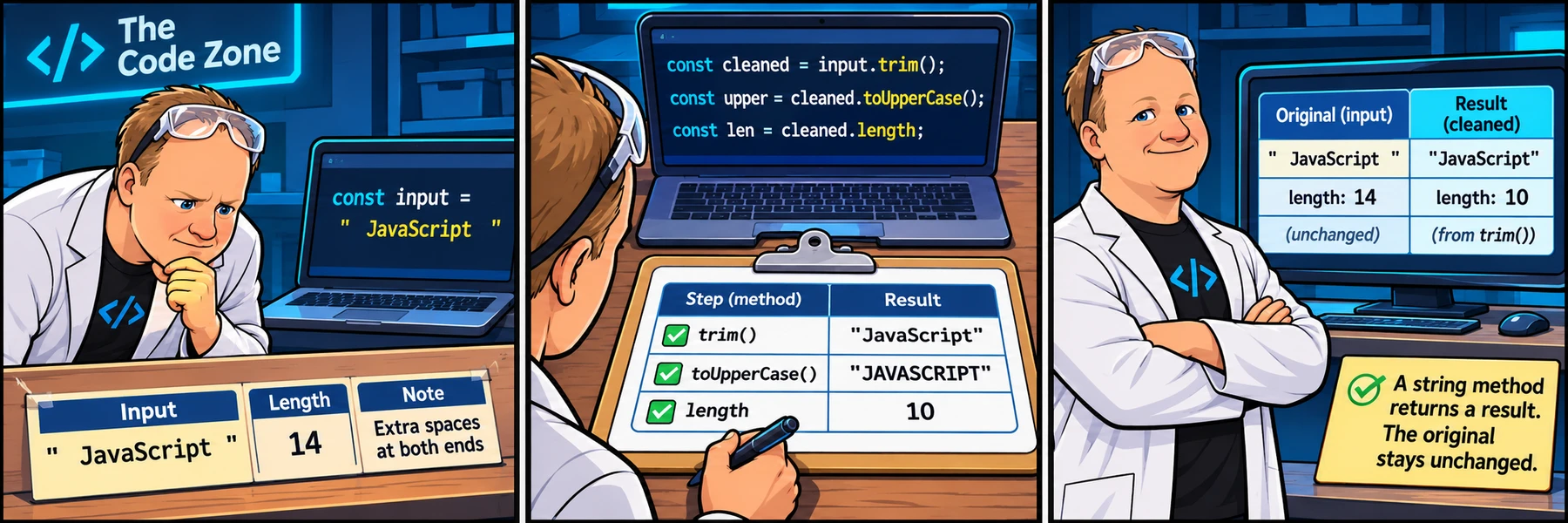
A method is a function available through a value. You can use these built-in tools without writing a function yourself. Parentheses call the method.
trim() removes whitespace from the beginning and end, not spaces between words. toUpperCase() returns uppercase text; toLowerCase() returns lowercase text. These methods return a new string rather than changing the original.
const original = "  Code Zone  ";
const trimmed = original.trim();
const upper = trimmed.toUpperCase();
console.log(upper); // CODE ZONE
console.log(original); // Still has its original spacesUse the result of one step in the next
You can call another method on the string returned by the first one. Read the chain from left to right: trim the edges, then change the case. Keeping separate variables is also fine.
Rob’s longer walkthrough explores more methods, including character positions and searching. You do not need to memorize the full list before doing the focused label challenge. Return to the video when you want another example.
const rawLabel = "  study group  ";
const label = rawLabel.trim().toUpperCase();
console.log(label); // STUDY GROUP
console.log(label.length); // 11Read a character by its position
Character positions start at zero. In "Study", S is at index 0, t is at index 1 and u is at index 2. charAt(2) therefore reads the third letter, not the second.
Predict the four output lines before loading this example. Then change the input to "Code": which last letter should print? word.length - 1 finds the final index instead of hardcoding it. These examples use ordinary Latin letters; JavaScript string indexing counts UTF-16 code units, so some emoji need different handling.
const word = "Study";
console.log(word.charAt(0)); // S
console.log(word.charAt(2)); // u
console.log(word.charAt(word.length - 1)); // y
console.log(word); // Study: reading a character does not change itAsk whether text contains a piece
includes() answers a yes/no question, printed as true or false. It searches for the exact sequence you supply, including its capitalization. It does not change the original string.
Predict why searching for "Code" succeeds but searching for "code" does not. If your task deliberately ignores case, compare lowercase copies. Keep the original message so its display capitalization is preserved.
const message = "Welcome to Code Zone";
console.log(message.includes("Code")); // true
console.log(message.includes("code")); // false
console.log(message.toLowerCase().includes("code")); // true
console.log(message); // Welcome to Code ZoneTake a slice without changing the original
Reveal the example and explanation
Optional reference from the longer source lesson: slice(start, end) returns text beginning at start and stopping before end. In "Code Zone", the space is at index 4 and Z is at index 5, so slice(5, 9) returns "Zone".
Read the output before changing anything. Then try slice(0, 4) and predict why it returns "Code" without the space. The original label stays unchanged. You do not need this method to pass the next cleanup challenge.
const label = "Code Zone";
const topic = label.slice(5, 9);
console.log(topic); // Zone
console.log(label); // Code ZoneReady to try it?
Practice in your browser and see your results.
Progress details
Have a question?
Ask the Code Zone community.
Ask a question in The Code Zone (opens in a new tab)