012 · Selection, chance and loops / Practice · 12 min
Roll a die and name its color
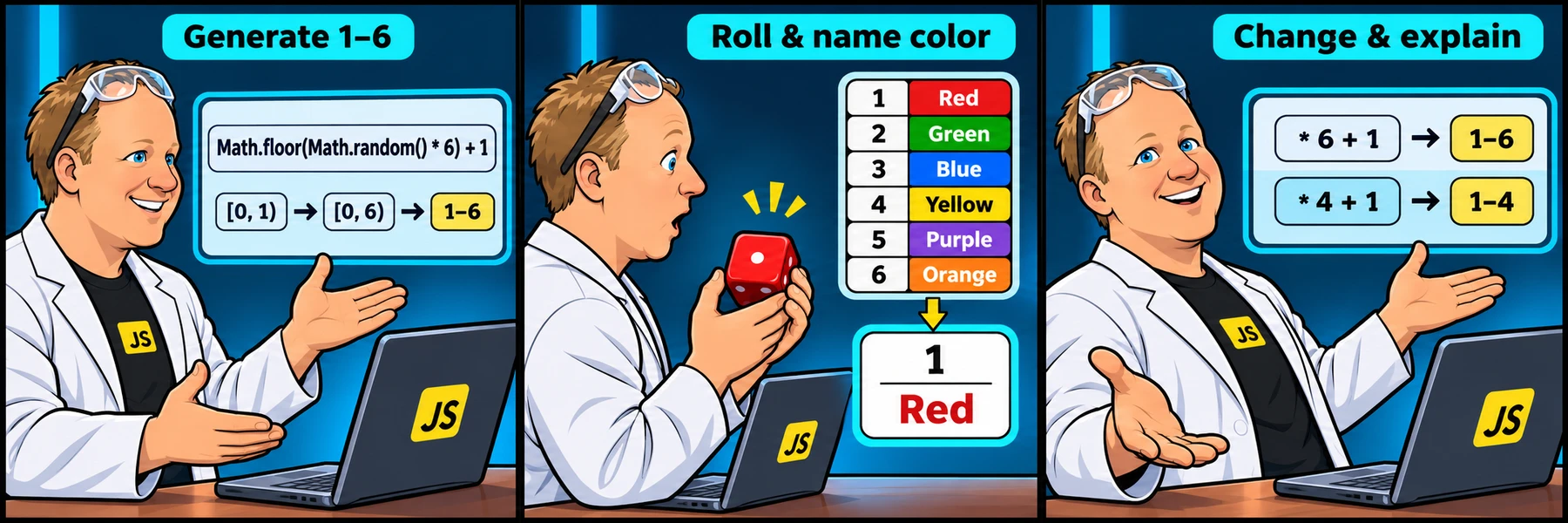
Math.random() is in [0, 1). Multiplying by 6 gives [0, 6); floor produces 0 through 5; adding 1 gives 1 through 6. Math.round would give uneven endpoint probabilities.
Activity 2 of 5 in Selection, chance and loops
ORIGINAL WALKTHROUGH · 06:35
Watch with Rob.
Try the challenge first. When you need help, watch Rob work through it, pause to try a change, then check your own code below.
You are signed in, but video access needs attention. Check your account access. Your saved work is kept.
Video walkthroughs are included with an active Code Zone membership. The written lesson and practice are free.
Your challenge
Generate one integer from 1 through 6 with Math.floor(Math.random() * 6) + 1. Assign Red, Green, Blue, Yellow, Purple and Orange to rolls 1 through 6 respectively. Use a conditional chain, then print the roll followed by the color on a separate line. Each check supplies one random draw; Run code uses real randomness.
Keep the supplied input variables at the top. The checks change only those initial values in a separate sandbox and compare the result. They also check the explicitly requested code structures. Your own editor and saved draft are not changed by the scenario checks.
Scale, floor, then shift
Math.random() is in [0, 1). Multiplying by 6 gives [0, 6); floor produces 0 through 5; adding 1 gives 1 through 6. Math.round would give uneven endpoint probabilities.
Keep the mapping straight
This challenge uses capitalized Red, Green, Blue, Yellow, Purple, Orange. The earlier switch challenge intentionally has a different five-color mapping. Do not silently copy one mapping into the other.
Run, check and explain
Press Run code to see your current output. Choose Check challenge for named feedback on the starting case and variations. After three failed checks—or immediately after passing—you can reveal an explained example without replacing your code.
Signed-out work stays on this browser. Signed-in learners can save an account draft, submit for review and share a separate help snapshot. A passed browser check is practice feedback, not an instructor-certified grade.
YOUR TURN
Rolling a colored die
Generate one integer from 1 through 6 with Math.floor(Math.random() * 6) + 1. Assign Red, Green, Blue, Yellow, Purple and Orange to rolls 1 through 6 respectively. Use a conditional chain, then print the roll followed by the color on a separate line. Each check supplies one random draw; Run code uses real randomness.
Checks run separate copies with supplied inputs; your editor stays unchanged.
- Use conditional branches
- Roll 1 maps to Red
- Roll 2 maps to Green
- Roll 3 maps to Blue
- Roll 4 maps to Yellow
- Roll 5 maps to Purple
- Roll 6 maps to Orange
- The highest possible draw still produces six
Sample output for the starting inputs
1
Red
Random values are supplied during checks. Run code uses real randomness.
Run code displays your current output. Check challenge checks the named scenarios and requested structures in a separate sandbox. Save account draft keeps your code across devices when signed in. Word wrap is enabled.
Ready to checkRun the checks to see your results here.
Your check results
Need a nudge?
Watch the order of operations
Place + 1 outside Math.floor, after flooring the scaled random value.
Use one draw for one die
Save the roll once, then compare that value in every branch.
One possible solution
Your code may look different and still be correct. Compare the approach with your own.
Math.random() is in [0, 1). Multiplying by 6 gives [0, 6); floor produces 0 through 5; adding 1 gives 1 through 6. Math.round would give uneven endpoint probabilities. This challenge uses capitalized Red, Green, Blue, Yellow, Purple, Orange. The earlier switch challenge intentionally has a different five-color mapping. Do not silently copy one mapping into the other.
const roll = Math.floor(Math.random() * 6) + 1;
let color;
if (roll === 1) color = "Red";
else if (roll === 2) color = "Green";
else if (roll === 3) color = "Blue";
else if (roll === 4) color = "Yellow";
else if (roll === 5) color = "Purple";
else color = "Orange";
console.log(roll);
console.log(color);