02.01 · Unpack and edit lists / Watch · 14 min
Give each list item its own name
Unpacking assigns items to names in order. A starred name collects the remaining items in a list.
Activity 1 of 4 in Unpack and edit lists
Python 3: Lists / 02.01
Understand unpacking
Not started
Match values to names, then collect the remaining values with a starred target.
Your lesson progress
Empty: not started. Yellow: in progress. Green: complete. Marking the whole activity complete does not replace your test results. These circles save in this browser for this pilot.
ORIGINAL WALKTHROUGH · 8:43
Watch with Rob.
Pause whenever you want to try a change. You can return to the lesson at any time.
You are signed in, but video access needs attention. Check your account access. Your saved work is kept.
Video walkthroughs are included with an active Code Zone membership. The written lesson and practice are free.
Open video & code editor (opens in a new tab)Match the number of names to the number of values
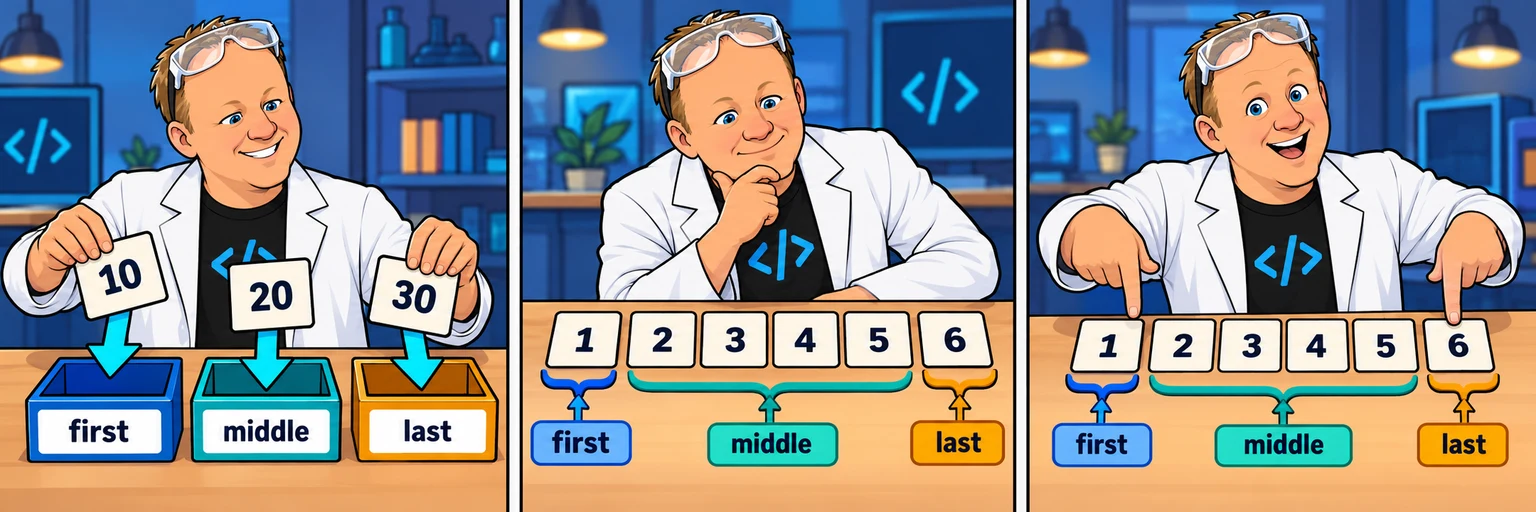
Place the names on the left of = and the collection on the right. Python evaluates the right side, then assigns each item to the corresponding name. The first item goes to first, the next to second and the last to third.
Without a starred target, the counts must match exactly. Too few or too many values raise ValueError. Unpacking does not remove items from the original list.
numbers = [10, 20, 30]
first, second, third = numbers
print(first)   # 10
print(second)  # 20
print(third)   # 30
print(numbers) # unchangedCollect the middle with one starred target
In first, *middle, last = numbers, Python assigns the first item to first, the last item to last and the intervening items to middle. middle is a new list, even if it contains only one item or no items.
This pattern needs at least two items for its two ordinary names. You can use only one starred target in this assignment.
numbers = [1, 2, 3, 4, 5, 6]
first, *middle, last = numbers
print(first)   # 1
print(middle)  # [2, 3, 4, 5]
print(last)    # 6

first, *middle, last = [10, 20]
print(middle) # []Build it one step at a time
Prefer learning by typing? Work through short instructions, run the Python code and check each change before continuing. Your guided project saves separately from the challenge below.
The mini-lesson opens in a new tab. Your own code carries forward; each step has a focused check and an optional hint.
Start mini-lesson(opens in a new tab)4 steps · Saved work · Instant feedback
YOUR TURN
Unpack colors and numbers
Unpack three colors, then first/middle/last from six numbers. Preserve both inputs and print the three colors, first number, middle list and last number.
red
green
blue
10
[20, 30, 40, 50]
60
Keep the starting inputs. Print these lines in this order, without extra output.
- Store the requested colors
- Store the requested numbers
- Store the requested first color
- Store the requested second color
- Store the requested third color
- Store the requested first number
- Store the requested middle numbers
- Store the requested last number
- Output 1 matches the requested checkpoint
- Output 2 matches the requested checkpoint
- Output 3 matches the requested checkpoint
- Output 4 matches the requested checkpoint
- Output 5 matches the requested checkpoint
- Output 6 matches the requested checkpoint
Edit Python, then run it. Check challenge checks your output and the listed Python requirements. Your code saves on this browser after a short pause. Sign in and choose Save account draft to keep it across devices. Word wrap is enabled.
Ready to checkRun the checks to see your results here.
Your check results
Need a nudge?
Match colors to names
Put all three names on the left and colors on the right of one assignment.
Collect everything between endpoints
Use a star before middle_numbers in the left-hand names. The remaining values are collected as a new list.
One possible solution
Your code may look different and still be correct. Compare the approach with your own.
The original lists are unchanged. Ordinary targets get one value each; the starred target receives the remaining values as a list.
Walk through the fix.
Choose Next to inspect one change at a time. Highlighted lines show what to notice. Your editor stays unchanged unless you choose to load a step.
Step 1 of 2
Read the original inputs
Keep the supplied inputs so each check has the same starting point.
colors = ["red", "green", "blue"]
numbers = [10, 20, 30, 40, 50, 60]Expected output for this step
(No output)
Trace each assignment and change
The original lists are unchanged. Ordinary targets get one value each; the starred target receives the remaining values as a list.
colors = ["red", "green", "blue"]
numbers = [10, 20, 30, 40, 50, 60]
first_color, second_color, third_color = colors
first_number, *middle_numbers, last_number = numbers
print(first_color)
print(second_color)
print(third_color)
print(first_number)
print(middle_numbers)
print(last_number)Expected output for this step
red
green
blue
10
[20, 30, 40, 50]
60
See the complete solution
colors = ["red", "green", "blue"]
numbers = [10, 20, 30, 40, 50, 60]
first_color, second_color, third_color = colors
first_number, *middle_numbers, last_number = numbers
print(first_color)
print(second_color)
print(third_color)
print(first_number)
print(middle_numbers)
print(last_number)Ready to try it?
Practice in your browser and see your results.
Progress details
Have a question?
Ask the Code Zone community.
Ask a question in The Code Zone (opens in a new tab)