JavaScript / JavaScript / Booleans and Numbers
Build a MathbotMake random ranges and rounding rules observable.
Watch Rob build the project, understand what each part is for, then work through the official freeCodeCamp workshop at your own pace.
ORIGINAL WALKTHROUGH · 33:48
Watch with Rob.
Pause whenever you want to try a change. You can return to the lesson at any time.
You are signed in, but video access needs attention. Check your account access. Your saved work is kept.
Video walkthroughs are included with an active Code Zone membership. The written lesson and practice are free.
Rob’s public YouTube walkthrough is paired with the current official exercise below. Use the current freeCodeCamp checks as the source of truth when a recording differs.
THE IDEA BEHIND THE BUILD
What this workshop teaches
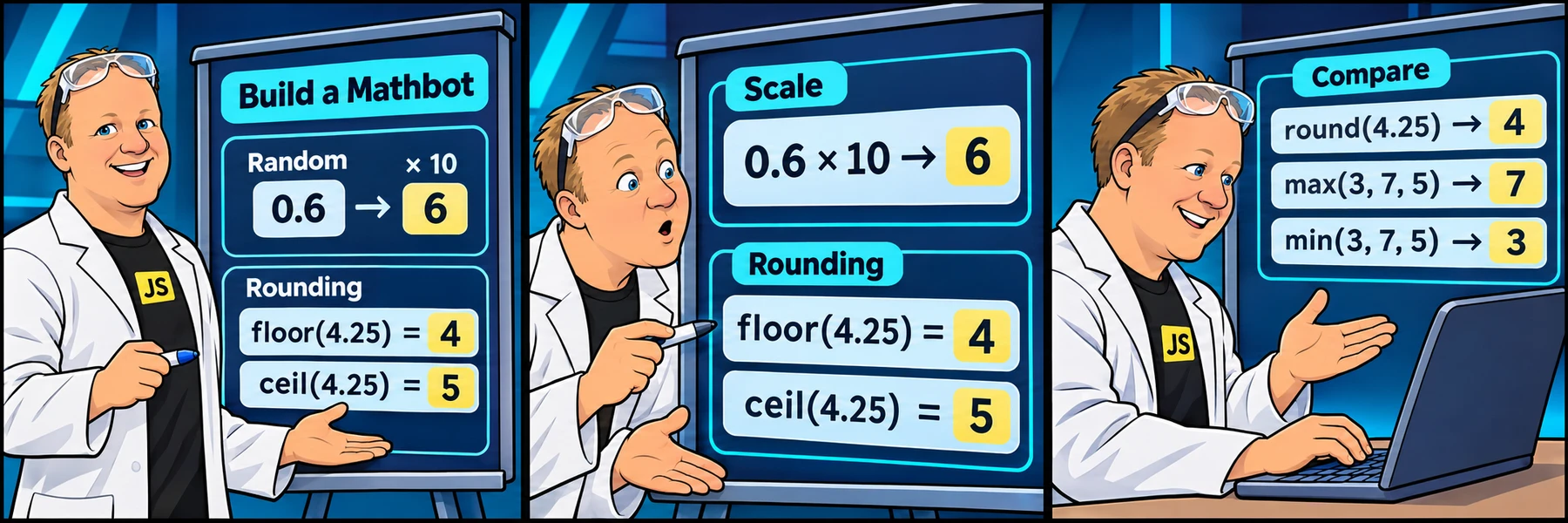
Compare random fractions, scaled intervals, rounding directions and numeric extrema. Follow the program in execution order: identify its inputs, predict the next value and compare that prediction with the console output.
Use each explanation to understand the reasoning, then make your own changes in the official editor. The examples below use a separate workshop scenario rather than supplying the completed freeCodeCamp solution.
Generate random values
Introduce the bot and scale a random fraction.
Compare downward and upward rounding
Apply floor, generate integer samples and apply ceil.
Round and compare groups
Use round, max and min before the farewell.
16 SMALL STEPS · THREE CLEAR GOALS
Your route through the workshop
These groups are a reading guide to the workshop, rather than timestamped chapters of the video.
Generate random values
Introduce the bot and scale a random fraction.
Check your understanding: Is the upper endpoint included in the workshop’s scaled random interval?
Explore step 1Compare downward and upward rounding
Apply floor, generate integer samples and apply ceil.
Check your understanding: How do floor and ceil differ on the same positive or negative input?
Explore step 6Round and compare groups
Use round, max and min before the farewell.
Check your understanding: Which values round up, and which arguments are returned by max and min?
Explore step 12SEE HOW THE PARTS FIT
How the program fits together
This independent example demonstrates one program pattern from the project. Predict its output before trying the related official requirement; it is not a finished lab solution.
const sample = Math.random();
console.log(sample);
Stored valuesName the data that later expressions read.Expressions and controlTransform values or select the path that runs.Console outputInspect the result at a deliberate point in execution.Three things to pay attention to
An unplanned random endpoint
The workshop’s scaled formula excludes its upper bound. Do not silently replace it with a different interval.
Confusing rounding direction
Floor moves downward and ceil moves upward; round chooses the nearest integer.
Passing an unspread array
These examples pass numeric arguments to max and min. The project does not ask you to introduce arrays.
UNDERSTAND IT HERE · PRACTICE IT THERE
Explore each step
Choose a step for a plain-English explanation, a separate code example and resources to explore. When you are ready, its button opens the official freeCodeCamp step. Your official tests and completion stay on freeCodeCamp.
Step 1Interpolate a value into a sentence
UNDERSTAND THE IDEA
Template literals use backticks and interpolate expressions inside dollar-sign braces. The expression is evaluated when the string is created. Ordinary quote marks do not interpret that interpolation syntax.
What you will do
Create botName and greeting, insert the bot name into the requested sentence and print greeting.
const tool = "brush";
const note = `Bring a ${tool}.`;
console.log(note);
What to notice: The variable goes inside the braces; the surrounding sentence remains literal text.
Resources to explore
Read another explanation or experiment with examples before trying the official step.
Ready to try it? Use freeCodeCamp’s exact requirements and run its checks there. The example above is for understanding the concept.
Step 2Read a message in the console
UNDERSTAND THE IDEA
A console message is observable output from a running program. Quoted text is a literal; an unquoted variable name asks JavaScript to read the value stored under that name. Separate calls appear in execution order.
What you will do
Print the explanation of the interval produced by Math.random.
const workshop = "Clay studio";
console.log(workshop);
What to notice: The console prints the value, rather than the variable name or its quotation marks.
Resources to explore
Read another explanation or experiment with examples before trying the official step.
Ready to try it? Use freeCodeCamp’s exact requirements and run its checks there. The example above is for understanding the concept.
Step 3Generate a value in a known interval
UNDERSTAND THE IDEA
Math.random returns a pseudo-random number greater than or equal to zero and strictly less than one. Repeated runs can produce different values. A single observed value is not evidence of the entire range.
What you will do
Create randomNum from a call to Math.random and print the sampled value.
const sample = Math.random();
console.log(sample);
What to notice: Zero is possible; one is excluded. The result is not yet a numbered choice.
Resources to explore
Read another explanation or experiment with examples before trying the official step.
Ready to try it? Use freeCodeCamp’s exact requirements and run its checks there. The example above is for understanding the concept.
Step 4Scale a random fraction
UNDERSTAND THE IDEA
Multiplication stretches a random fraction across a wider interval; addition shifts that interval. Work out which endpoints are included before adding rounding, because rounding can change the set of possible outputs.
What you will do
Print the range introduction, then create the min and max bindings requested in the workshop.
const low = 20;
const high = 30;
const sample = Math.random() * (high - low) + low;
What to notice: This produces a number at least twenty and less than thirty, usually with a fractional part.
Resources to explore
Read another explanation or experiment with examples before trying the official step.
Ready to try it? Use freeCodeCamp’s exact requirements and run its checks there. The example above is for understanding the concept.
Step 5Scale a random fraction
UNDERSTAND THE IDEA
Multiplication stretches a random fraction across a wider interval; addition shifts that interval. Work out which endpoints are included before adding rounding, because rounding can change the set of possible outputs.
What you will do
Create randomNum2 using the supplied scaled-range expression and print the result.
const low = 20;
const high = 30;
const sample = Math.random() * (high - low) + low;
What to notice: This produces a number at least twenty and less than thirty, usually with a fractional part.
Resources to explore
Read another explanation or experiment with examples before trying the official step.
Ready to try it? Use freeCodeCamp’s exact requirements and run its checks there. The example above is for understanding the concept.
Step 6Read a message in the console
UNDERSTAND THE IDEA
A console message is observable output from a running program. Quoted text is a literal; an unquoted variable name asks JavaScript to read the value stored under that name. Separate calls appear in execution order.
What you will do
Print the explanation of downward rounding before demonstrating it.
const workshop = "Clay studio";
console.log(workshop);
What to notice: The console prints the value, rather than the variable name or its quotation marks.
Resources to explore
Read another explanation or experiment with examples before trying the official step.
Ready to try it? Use freeCodeCamp’s exact requirements and run its checks there. The example above is for understanding the concept.
Step 7Round down on the number line
UNDERSTAND THE IDEA
Math.floor returns the greatest integer less than or equal to its input. Down means toward negative infinity, not merely removing the decimal digits; negative inputs reveal that distinction.
What you will do
Create numRoundedDown by applying Math.floor to the specified fractional value and print it.
console.log(Math.floor(8.9));
console.log(Math.floor(-8.1));
What to notice: The results are eight and negative nine. Both move downward on the number line.
Resources to explore
Read another explanation or experiment with examples before trying the official step.
Ready to try it? Use freeCodeCamp’s exact requirements and run its checks there. The example above is for understanding the concept.
Step 8Read a message in the console
UNDERSTAND THE IDEA
A console message is observable output from a running program. Quoted text is a literal; an unquoted variable name asks JavaScript to read the value stored under that name. Separate calls appear in execution order.
What you will do
Print the introduction to random integers before building the calculation.
const workshop = "Clay studio";
console.log(workshop);
What to notice: The console prints the value, rather than the variable name or its quotation marks.
Resources to explore
Read another explanation or experiment with examples before trying the official step.
Ready to try it? Use freeCodeCamp’s exact requirements and run its checks there. The example above is for understanding the concept.
Step 9Turn a random interval into integer choices
UNDERSTAND THE IDEA
Flooring a scaled random value selects integer positions. Endpoint inclusion depends on where you apply the scaling and whether the width includes an extra one. Match the workshop’s requested interval rather than borrowing an inclusive formula blindly.
What you will do
Create randomInt by flooring the workshop’s scaled interval, then print the generated integer.
const index = Math.floor(Math.random() * 3);
console.log(index);
What to notice: The possible outputs are zero, one and two. The upper bound three is excluded.
Resources to explore
Read another explanation or experiment with examples before trying the official step.
Ready to try it? Use freeCodeCamp’s exact requirements and run its checks there. The example above is for understanding the concept.
Step 10Read a message in the console
UNDERSTAND THE IDEA
A console message is observable output from a running program. Quoted text is a literal; an unquoted variable name asks JavaScript to read the value stored under that name. Separate calls appear in execution order.
What you will do
Print the explanation of upward rounding before demonstrating it.
const workshop = "Clay studio";
console.log(workshop);
What to notice: The console prints the value, rather than the variable name or its quotation marks.
Resources to explore
Read another explanation or experiment with examples before trying the official step.
Ready to try it? Use freeCodeCamp’s exact requirements and run its checks there. The example above is for understanding the concept.
Step 11Round upward on the number line
UNDERSTAND THE IDEA
Math.ceil returns the smallest integer greater than or equal to the input. Compare it with floor using the same value so the direction of rounding is the only thing that changes.
What you will do
Create numRoundedUp using Math.ceil on the supplied value and print it.
console.log(Math.ceil(8.1));
console.log(Math.floor(8.1));
What to notice: Ceil produces nine while floor produces eight for the same positive input.
Resources to explore
Read another explanation or experiment with examples before trying the official step.
Ready to try it? Use freeCodeCamp’s exact requirements and run its checks there. The example above is for understanding the concept.
Step 12Read a message in the console
UNDERSTAND THE IDEA
A console message is observable output from a running program. Quoted text is a literal; an unquoted variable name asks JavaScript to read the value stored under that name. Separate calls appear in execution order.
What you will do
Print the introduction to rounding to the nearest whole integer.
const workshop = "Clay studio";
console.log(workshop);
What to notice: The console prints the value, rather than the variable name or its quotation marks.
Resources to explore
Read another explanation or experiment with examples before trying the official step.
Ready to try it? Use freeCodeCamp’s exact requirements and run its checks there. The example above is for understanding the concept.
Step 13Choose the nearest integer
UNDERSTAND THE IDEA
Math.round chooses the nearest integer; a halfway value rounds toward positive infinity. It serves a different purpose from always moving down with floor or always moving up with ceil.
What you will do
Create and print numRounded and numRounded2 for the two supplied values; compare their rounding directions.
console.log(Math.round(8.2));
console.log(Math.round(8.8));
What to notice: The two values land on opposite sides of the halfway point and round differently.
Resources to explore
Read another explanation or experiment with examples before trying the official step.
Ready to try it? Use freeCodeCamp’s exact requirements and run its checks there. The example above is for understanding the concept.
Step 14Read a message in the console
UNDERSTAND THE IDEA
A console message is observable output from a running program. Quoted text is a literal; an unquoted variable name asks JavaScript to read the value stored under that name. Separate calls appear in execution order.
What you will do
Print the introduction to finding the largest and smallest argument.
const workshop = "Clay studio";
console.log(workshop);
What to notice: The console prints the value, rather than the variable name or its quotation marks.
Resources to explore
Read another explanation or experiment with examples before trying the official step.
Ready to try it? Use freeCodeCamp’s exact requirements and run its checks there. The example above is for understanding the concept.
Step 15Compare a set of numeric values
UNDERSTAND THE IDEA
Math.max and Math.min return the largest and smallest argument, respectively. They do not return the argument’s position. Check the data, not the order in which the arguments were written.
What you will do
Create and print maxNum and minNum from the two supplied groups of numbers.
console.log(Math.max(14, 6, 21));
console.log(Math.min(14, 6, 21));
What to notice: The results are twenty-one and six, regardless of argument order.
Resources to explore
Read another explanation or experiment with examples before trying the official step.
Ready to try it? Use freeCodeCamp’s exact requirements and run its checks there. The example above is for understanding the concept.
Step 16Read a message in the console
UNDERSTAND THE IDEA
A console message is observable output from a running program. Quoted text is a literal; an unquoted variable name asks JavaScript to read the value stored under that name. Separate calls appear in execution order.
What you will do
Finish the workshop with its closing message after the Math demonstrations.
const workshop = "Clay studio";
console.log(workshop);
What to notice: The console prints the value, rather than the variable name or its quotation marks.
Resources to explore
Read another explanation or experiment with examples before trying the official step.
Ready to try it? Use freeCodeCamp’s exact requirements and run its checks there. The example above is for understanding the concept.
READY TO BUILD?
Keep the instructions beside the video.
Start the official workshop in a new tab, play the walkthrough here, and pause to make each change yourself. Run freeCodeCamp’s checks before moving on. Write and check your project in the official freeCodeCamp editor.
An independent walkthrough by The Code Zone. Not affiliated with or endorsed by freeCodeCamp. The project and official tests belong to freeCodeCamp; the explanations and visual guide on this page are our companion material.