JavaScript / JavaScript / Variables and Strings
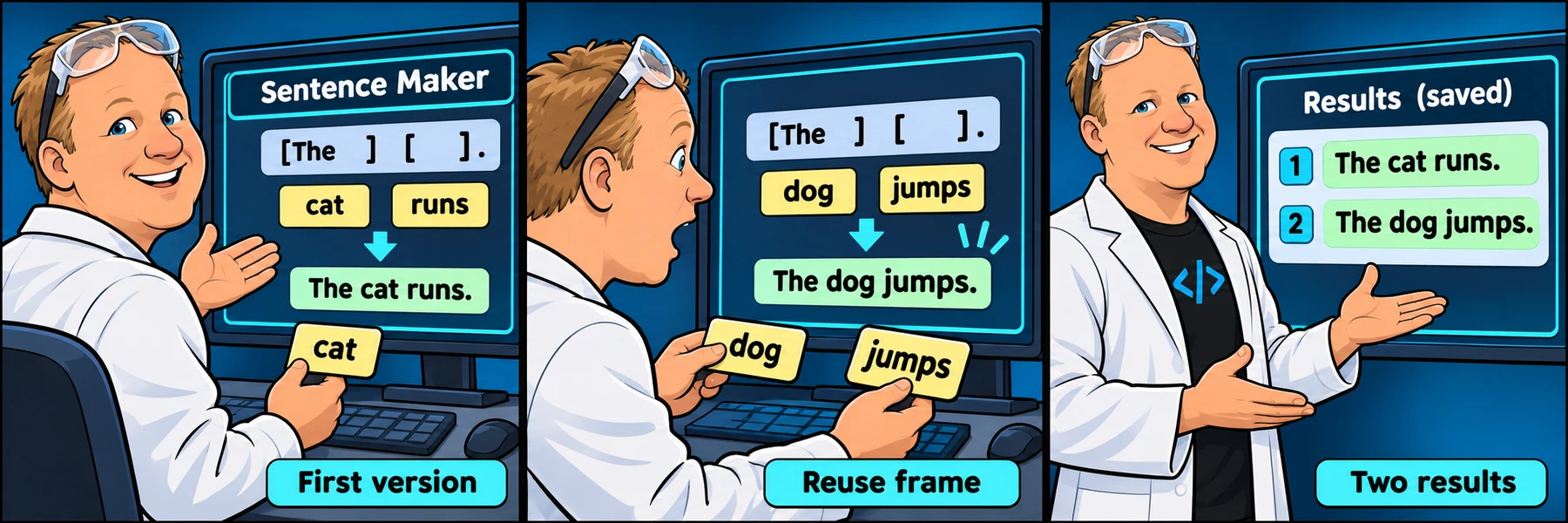
Build a Sentence MakerReuse a story frame with two sets of words.
Watch Rob build the project, understand what each part is for, then work through the official freeCodeCamp lab at your own pace.
ORIGINAL WALKTHROUGH · 9:00
Watch with Rob.
Pause whenever you want to try a change. You can return to the lesson at any time.
You are signed in, but video access needs attention. Check your account access. Your saved work is kept.
Video walkthroughs are included with an active Code Zone membership. The written lesson and practice are free.
Rob’s public YouTube walkthrough is paired with the current official exercise below. Use the current freeCodeCamp checks as the source of truth when a recording differs. This page uses the matching public channel walkthrough; the Skool classroom also contains a native recording, which may have a different edit or duration.
THE IDEA BEHIND THE BUILD
What this lab teaches
Separate the words that change from the sentence frame that stays the same. Follow the program in execution order: identify its inputs, predict the next value and compare that prediction with the console output.
Use each explanation to understand the reasoning, then make your own changes in the official editor. The examples below use a separate workshop scenario rather than supplying the completed freeCodeCamp solution.
Prepare the story values
Declare words and the first story binding.
Assemble the first version
Build and print the first story.
Reuse the frame
Replace the words and create a second stored result.
REVIEW THE REQUIREMENTS · THREE CLEAR GOALS
Your route through the lab
These groups are a reading guide to the lab, rather than timestamped chapters of the video.
Prepare the story values
Declare words and the first story binding.
Check your understanding: Which of the six words needs let because it changes for the second story?
Explore requirement 1Assemble the first version
Build and print the first story.
Check your understanding: Does every word appear in the required position with the right spaces?
Explore requirement 4Reuse the frame
Replace the words and create a second stored result.
Check your understanding: Why does reassigning the words leave firstStory unchanged?
Explore requirement 6SEE HOW THE PARTS FIT
How the program fits together
This independent example demonstrates one program pattern from the project. Predict its output before trying the related official requirement; it is not a finished lab solution.
let studioName;
studioName = "River Studio";
Stored valuesName the data that later expressions read.Expressions and controlTransform values or select the path that runs.Console outputInspect the result at a deliberate point in execution.Three things to pay attention to
An early saved story changes only in your imagination
The first assembled string stays fixed when its word bindings are later reassigned.
A new frame for the second story
Use the same required story frame with new words so the test compares the intended pattern.
Missing word replacements
Update all six word values before assembling the second story.
UNDERSTAND IT HERE · PRACTICE IT THERE
Explore each requirement
Choose a requirement for a plain-English explanation, a separate code example and resources to explore. When you are ready, its button opens the official freeCodeCamp lab. Your official tests and completion stay on freeCodeCamp.
Requirement 1Give a value a name
UNDERSTAND THE IDEA
A declaration introduces a binding that later statements can reference. Use let when the workshop will reassign that binding. Declaring a name and assigning its first value can happen separately or in one statement.
What you will do
Declare the six requested story-word bindings using let so you can change their values later.
let studioName;
studioName = "River Studio";
What to notice: The declaration introduces the name; the assignment supplies its current value.
Resources to explore
Read another explanation or experiment with examples before trying the official lab.
Ready to try it? Use freeCodeCamp’s exact requirements and run its checks there. The example above is for understanding the concept.
Requirement 2Store the first text value
UNDERSTAND THE IDEA
The assignment operator takes the expression on its right and stores its value under the name on its left. Text needs quotation marks; otherwise JavaScript treats the word as a name to look up.
What you will do
Give each story-word binding a text value of your choice.
let material;
material = "clay";
What to notice: The quotes identify text. The equals sign performs assignment, not comparison.
Resources to explore
Read another explanation or experiment with examples before trying the official lab.
Ready to try it? Use freeCodeCamp’s exact requirements and run its checks there. The example above is for understanding the concept.
Requirement 3Give a value a name
UNDERSTAND THE IDEA
A declaration introduces a binding that later statements can reference. Use let when the workshop will reassign that binding. Declaring a name and assigning its first value can happen separately or in one statement.
What you will do
Introduce firstStory to hold the assembled first version.
let studioName;
studioName = "River Studio";
What to notice: The declaration introduces the name; the assignment supplies its current value.
Resources to explore
Read another explanation or experiment with examples before trying the official lab.
Ready to try it? Use freeCodeCamp’s exact requirements and run its checks there. The example above is for understanding the concept.
Requirement 4Build a message from stored values
UNDERSTAND THE IDEA
Concatenation joins text fragments into a new string. With strings, the plus operator joins rather than adds numbers. Spaces and punctuation must come from the literal fragments you supply.
What you will do
Build firstStory from the official story frame and the six stored word values, preserving the required spaces and punctuation.
const material = "clay";
const note = "Bring " + material + ".";
console.log(note);
What to notice: The space after Bring and the final period are part of the literal text.
Resources to explore
Read another explanation or experiment with examples before trying the official lab.
Ready to try it? Use freeCodeCamp’s exact requirements and run its checks there. The example above is for understanding the concept.
Requirement 5Read a message in the console
UNDERSTAND THE IDEA
A console message is observable output from a running program. Quoted text is a literal; an unquoted variable name asks JavaScript to read the value stored under that name. Separate calls appear in execution order.
What you will do
Print the first-story label followed by the assembled firstStory value.
const workshop = "Clay studio";
console.log(workshop);
What to notice: The console prints the value, rather than the variable name or its quotation marks.
Resources to explore
Read another explanation or experiment with examples before trying the official lab.
Ready to try it? Use freeCodeCamp’s exact requirements and run its checks there. The example above is for understanding the concept.
Requirement 6Change a binding for later statements
UNDERSTAND THE IDEA
Reassignment updates an existing let binding without redeclaring it. Statements that run afterward read the new value. A string assembled earlier is already a separate value and is not rebuilt automatically.
What you will do
Assign a new text value to each of the six existing word bindings.
let material = "clay";
const oldLabel = "Bring " + material;
material = "paper";
console.log(oldLabel, material);
What to notice: The saved label still mentions clay while material now holds paper.
Resources to explore
Read another explanation or experiment with examples before trying the official lab.
Ready to try it? Use freeCodeCamp’s exact requirements and run its checks there. The example above is for understanding the concept.
Requirement 7Give a value a name
UNDERSTAND THE IDEA
A declaration introduces a binding that later statements can reference. Use let when the workshop will reassign that binding. Declaring a name and assigning its first value can happen separately or in one statement.
What you will do
Introduce secondStory as a separate stored result.
let studioName;
studioName = "River Studio";
What to notice: The declaration introduces the name; the assignment supplies its current value.
Resources to explore
Read another explanation or experiment with examples before trying the official lab.
Ready to try it? Use freeCodeCamp’s exact requirements and run its checks there. The example above is for understanding the concept.
Requirement 8Build a message from stored values
UNDERSTAND THE IDEA
Concatenation joins text fragments into a new string. With strings, the plus operator joins rather than adds numbers. Spaces and punctuation must come from the literal fragments you supply.
What you will do
Assemble secondStory using the same story frame and the newly assigned words.
const material = "clay";
const note = "Bring " + material + ".";
console.log(note);
What to notice: The space after Bring and the final period are part of the literal text.
Resources to explore
Read another explanation or experiment with examples before trying the official lab.
Ready to try it? Use freeCodeCamp’s exact requirements and run its checks there. The example above is for understanding the concept.
Requirement 9Read a message in the console
UNDERSTAND THE IDEA
A console message is observable output from a running program. Quoted text is a literal; an unquoted variable name asks JavaScript to read the value stored under that name. Separate calls appear in execution order.
What you will do
Print the second-story label followed by secondStory and compare it with the first version.
const workshop = "Clay studio";
console.log(workshop);
What to notice: The console prints the value, rather than the variable name or its quotation marks.
Resources to explore
Read another explanation or experiment with examples before trying the official lab.
Ready to try it? Use freeCodeCamp’s exact requirements and run its checks there. The example above is for understanding the concept.
READY TO BUILD?
Keep the instructions beside the video.
Start the official lab in a new tab, play the walkthrough here, and pause to make each change yourself. Run freeCodeCamp’s checks before moving on. Write and check your project in the official freeCodeCamp editor.
An independent walkthrough by The Code Zone. Not affiliated with or endorsed by freeCodeCamp. The project and official tests belong to freeCodeCamp; the explanations and visual guide on this page are our companion material.