A different account copy exists. Choose which code to keep for these editors.
Learn first
Three tools for working with text
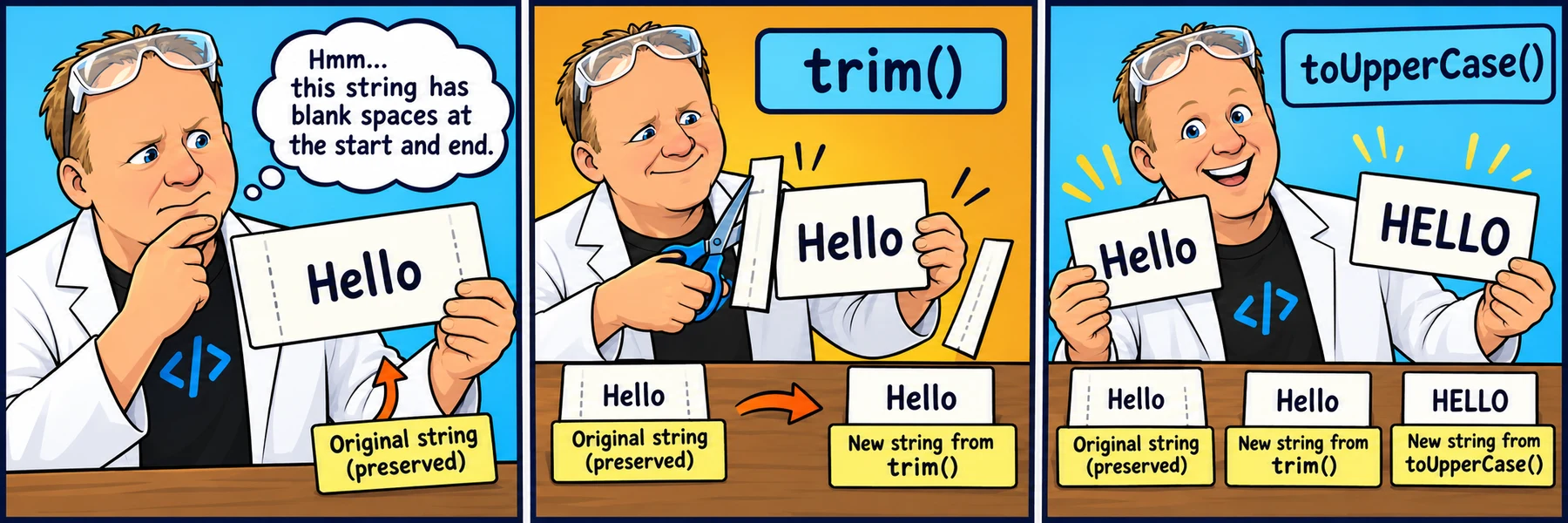
A string is text inside quotes. A method is a tool you call on that text using a dot, its exact name and parentheses: input1.trim().
These three methods return a new string. They do not change the original value.
Try each example here: predict the output, then choose Run code below its editor. Compare the output beside the code. Edit the text and run again.
Drag the divider between code and output to resize the two panes. You can also focus it and press the left or right arrow key. On phones, output sits below the code.
Each editor is independent, so experimenting here does not change a challenge below.
Saving: all nine editors save automatically in this browser and, when signed in, to your account for use on other devices.
Each Reset button restores only that editor’s original code after confirmation, then saves that reset.
Instructor examples stay separate from learner drafts.
Animated walkthrough · Remotion pilot
Send a word through the string method factory
Press Play to follow the code: store the word in input, send its value through the method, then store the returned string in output. Pause anywhere, drag the timeline, or choose a step to talk it through.
THE STRING METHOD FACTORY
let input = "PoppY";
let output = input.toLowerCase();
toLowerCase()
"PoppY"
"poppy"
input · unchanged
"PoppY"
output · new string
"poppy"
Store the original word in input.
0:00 / 0:14
The factory is a teaching picture for the method call: let output = input.toLowerCase(); stores the returned text in output. input still holds "PoppY"; output holds "poppy". This demo does not edit your saved practice code.
trim(): tidy the edges
Removes whitespace at the beginning and end, including spaces, tabs and line breaks. It keeps the space between Hello and there. It does not remove punctuation.
EDIT JAVASCRIPT
CONSOLE OUTPUT
Predict the result, then choose Run code.
Loading the editor…
Replace this editor’s code with its starting example?
Compare with the expected output for the starting code
Hello there
  Hello there
toLowerCase(): lowercase letters
Returns lowercase text. Spaces and punctuation stay. Capital C in Case matters: toLowercase is a different name and will cause an error.
EDIT JAVASCRIPT
CONSOLE OUTPUT
Predict the result, then choose Run code.
Loading the editor…
Replace this editor’s code with its starting example?
Compare with the expected output for the starting code
hello!
HeLLo!
toUpperCase(): uppercase letters
Returns uppercase text. Write a capital U and a capital C. Include the empty parentheses to call the method.
EDIT JAVASCRIPT
CONSOLE OUTPUT
Predict the result, then choose Run code.
Loading the editor…
Replace this editor’s code with its starting example?
Compare with the expected output for the starting code
HELLO!
HeLLo!
Chain methods: use the returned text
Read left to right: trim the edges, then lowercase that result. Both methods return a string, so you can put the next method after the first call. These examples also work with the two methods in the other order.
EDIT JAVASCRIPT
CONSOLE OUTPUT
Predict the result, then choose Run code.
Loading the editor…
Replace this editor’s code with its starting example?
Compare with the expected output for the starting code
hello!
  HeLLo!
Your turn
Make the comparison print true
=== asks whether two values are exactly equal, including spaces and capitalization. console.log prints that answer: true or false. Each starting challenge below prints false.
Change only the input1 expression inside console.log, to the left of ===. Add the needed method call after input1. Keep the two let declarations, their text values and === desiredOutput unchanged. Do not replace the comparison with true.
input1.trim(); on its own calculates a result and throws it away. Use the returned text directly in the comparison instead. Changing the original variable is a different task.
For each challenge: predict, edit, Run code, then Check challenge. Two checks validate the required edit and the actual output. A passing check does not submit anything or mark other challenges complete.
1. Make the letters uppercase
Make "PoppY" match "POPPY".
EDIT JAVASCRIPT
CONSOLE OUTPUT
Predict the result, then choose Run code.
Loading the editor…
Replace this editor’s code with its starting example?
Available after a passing check or three unsuccessful checks. Hints are available now.
2. Make the letters lowercase
Make "NoVa" match "nova".
EDIT JAVASCRIPT
CONSOLE OUTPUT
Predict the result, then choose Run code.
Loading the editor…
Replace this editor’s code with its starting example?
Available after a passing check or three unsuccessful checks. Hints are available now.
3. Remove the outside spaces
Make " Milo " match "Milo".
EDIT JAVASCRIPT
CONSOLE OUTPUT
Predict the result, then choose Run code.
Loading the editor…
Replace this editor’s code with its starting example?
Available after a passing check or three unsuccessful checks. Hints are available now.
4. Trim and lowercase
Make " RoBBie " match "robbie".
EDIT JAVASCRIPT
CONSOLE OUTPUT
Predict the result, then choose Run code.
Loading the editor…
Replace this editor’s code with its starting example?
Available after a passing check or three unsuccessful checks. Hints are available now.
5. Trim and uppercase, keep the middle space
Make " Star Club " match "STAR CLUB". Keep the space between the two words.
EDIT JAVASCRIPT
CONSOLE OUTPUT
Predict the result, then choose Run code.
Loading the editor…
Replace this editor’s code with its starting example?
Available after a passing check or three unsuccessful checks. Hints are available now.
Explain what changed
Which method changes capitalization?
Which removes outside spaces?
Why does the middle space in STAR CLUB stay?
What value does input1 still hold after the comparison?
Common mistakes: forgetting (), writing toUppercase instead of toUpperCase, and expecting lowercase to remove spaces. None of these three methods removes a period or question mark. That is a separate step in the name lookup lesson.